How to play Critter Loops
A wicked wizard has bewitched the animals into dizzying Critter Loops. Match three identical critters, break the curse and free them to the wildlife reserve!
Basics
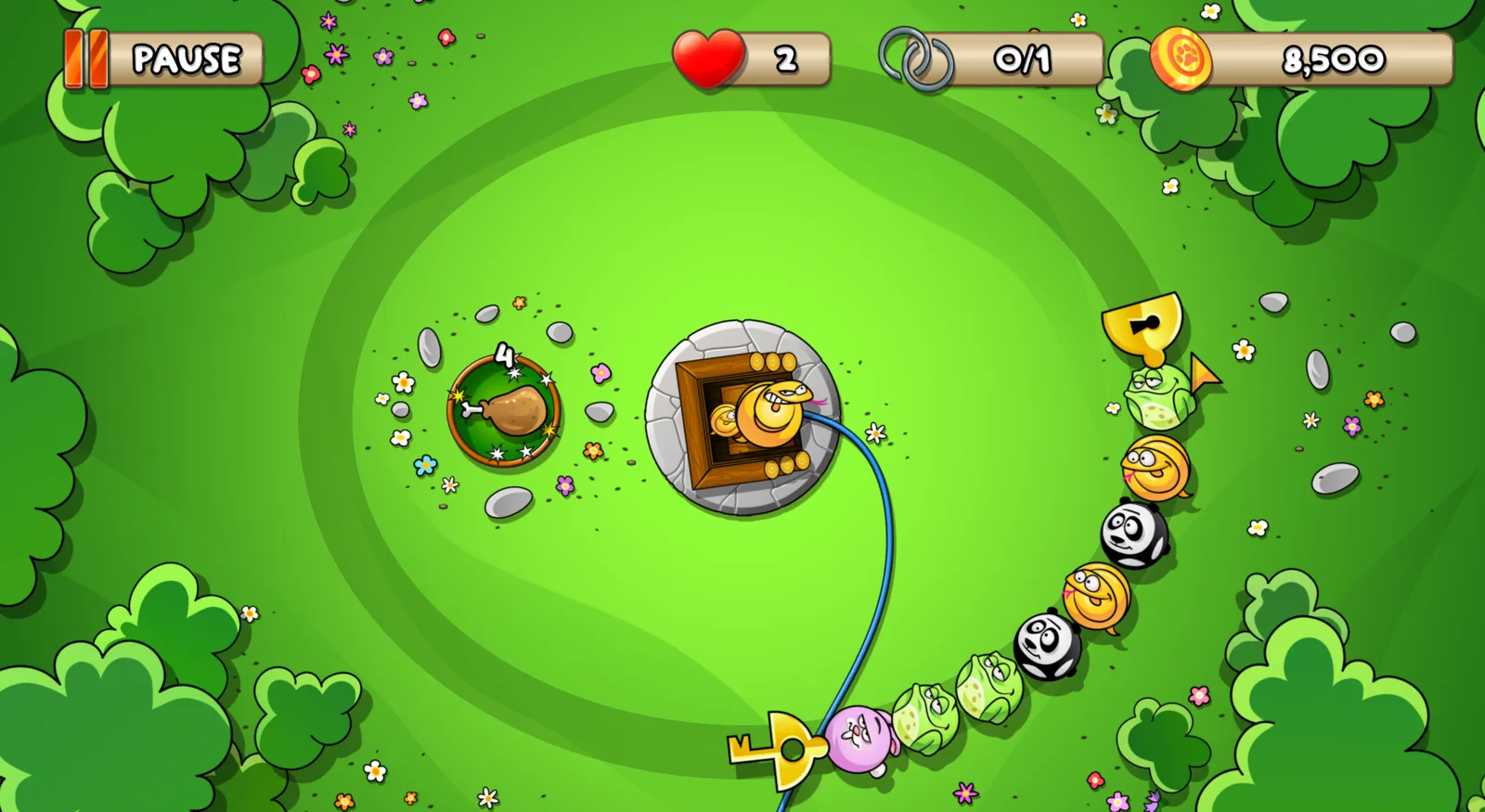
In every level, critters spin around in one or more rings. The next critter waits on the ramp in the centre.
- Tap the spot on the ring where the critter should land – it flies right there. No aiming, no cannon. On PC, you click with the mouse.
- Three identical critters in a row disappear. If that brings matching critters together again, you trigger a chain reaction.
- Tap the ramp to swap the two visible critters – so you always have a second choice.
- Clear all rings to win the level.
Watch the key! The rings spin and grow. Every critter that doesn't fit moves the key closer to the lock. Once it gets there, the level is lost.
Tip: Don't let any ring get too full – clearing the inner ring first often helps.
Scores and stars
- Base score for every match of three. Combos (several matches in a row) and chain reactions earn bonus points.
- Stars: how many stars you get – up to three – depends only on your time, not on your score. The faster you clear a level, the more stars you earn.
- Time bonus: your stars decide how big the time bonus is that is added to your base score.
- Hearts: if you clear a level with fewer than three stars, you lose a heart. The full version gives you unlimited hearts.
- Replay: you can replay any level at any time to improve.
- Hi-score: your best score per level is saved and compared with the best players worldwide.
Tip: Watch the clock! More stars mean a bigger time bonus – and with three stars you keep your heart.
Extras and obstacles
New extras and enemies join you as the campaign goes on.
Tip: Pick up extras fast – they are more powerful then!
- Hambone: tap it to pick it up, then tap anywhere to throw it. Critters love ham!
- Rhino: your best buddy – he clears everything in his path.
- Rockets and nukes: the red nuke sets critters on fire first, then you match them; not even stones can withstand the blue nuke.
- Tranquilizer: slows the critters down for a short time. Tip It doesn't just slow the critters – it slows down time, too.
- Chameleon: blends in and substitutes for any other critter.
- Stones: cannot be removed – plan around them.
- Ice: shoot frozen critters to break the ice.
- Evil bees: bewitched by the wizard – shoot them!
- The almighty carrot: Secret tip Psst! Find it for epic power.
Campaign, Zen mode and hearts
- Campaign: 101 levels on the world map. Tap an area to choose an individual level. Levels 1–70 are free; unlock levels 71–101 with a single one-time purchase. Once you have cleared all levels, the campaign starts again – with a score multiplier.
- Zen mode: play endlessly without a level goal – the difficulty increases over time. It counts how many rings you clear and unlocks as you progress through the campaign.
- Sticker book: earn stickers for special achievements – for example for every critter you free. The sticker book opens with your first sticker.
- Hearts: you need hearts to play. Clearing a level with fewer than three stars costs a heart; new hearts refill over time on their own. If you don't want to wait, the shop offers more hearts. The full version (including levels 71–101) gives you unlimited hearts. Critter Loops is completely ad-free.
Profiles and leaderboard
Under Menu → Profile you create new profiles, switch between them or delete them. Every profile has its own progress – so the whole family can play on one device without anyone having to start over.
Under Edit Profile → Edit Public name you also set your name for the leaderboard. This name is publicly visible – in the game and on our website. Please do not use your real name. Offensive names are not allowed; profiles using them will be blocked.
Transfer Profile
With Menu → Profile → Transfer Save you take your progress to another device – or switch between two devices, for example tablet and phone.
- On the device with your progress: Request code.
- On the other device, within 5 minutes: Enter code.
- Done – both devices now use the same progress.
Attention: the existing progress on the device where you enter the code will be overwritten. Each code can only be used once. Do not share it with others.
If your progress ever can't be synchronised with the server, the game asks which save you want to continue with: the one you last played on this device (Local) or the one last stored on the server (Server).
Settings
Under Menu → Settings & Help you can turn sound on or off and choose your language (Critter Loops is available in 14 language versions). You will also find the privacy policy and support there.
Help and support
Having a problem or a question? In the game, tap Menu → Settings & Help → Contact Support. Your email app opens with a prepared message to Spraylight. Briefly describe what happened.
To help you quickly, the message contains technical device and game data – for example device model, operating system, app version, language and game progress – but no details such as your name or address. We use this data only to help you and delete it as soon as your request has been resolved. See our privacy policy for details.